AI Ceiling Fan Trend Guide: Outfits, Photos & Credits
Published October 11, 2026
The ai ceiling fan trend has taken over social feeds as one of the most hypnotic visual concepts online. In every viral clip, a camera looks straight down from the ceiling while someone lies on a rug holding a remote control up toward a spinning fan. Every time a blade sweeps past the lens, their clothing changes in a sharp wipe cut while their pose and the room stay identical. Behind the scenes, making an ai ceiling fan trend clip does not require setting up a ladder, rigging a tripod to your ceiling, or changing your clothes four times in an afternoon. You only need a clean picture and the ceiling fan outfit change AI generator to handle the wipe cuts. This walkthrough explains the setup, styles, and prompt structures powering the ai ceiling fan trend across the platform.
Quick Summary of the AI Ceiling Fan Trend
Making a clip in the ai ceiling fan trend format requires just one clear portrait where your face and upper body are visible. If you select the couple mode, you can upload a second photo for your partner. You put your primary photo in the first slot and your partner’s picture in the second slot. On Ricebowl, rendering a 5-second clip with two outfit changes costs 20 credits, while a 10-second version with three outfit changes costs 40 credits. The fastest path to test your own shot is to head directly over to the ceiling fan transition AI tool page, upload your photo, select a visual style, and run the generation.
Origin of the Under the Fan Video Trend
The visual idea behind the ai ceiling fan trend began showing up in late August 2026, when an early Spanish-language editing tutorial surfaced demonstrating how to disguise clothing transitions behind spinning ceiling blades. By September 24, 2026, automated versions under the title “Under the Fan” started circulating heavily across short-form video feeds. Within days, the visual structure evolved into the ai ceiling fan trend people recognize today. Early tutorials inspired both automated edits and practical in-camera clips, but nobody holds a confirmed first post for the format. It spread as a shared creative format across multiple communities rather than tracing back to a single verified post.
Disambiguation: What This Format Is Not
Before diving in, it helps to clear up three completely different topics that share similar search terms:
- Not a home decor or appliance review: This is not a product review for household ceiling fixtures or airflow ratings.
- Not the seasonal directional switch: It has nothing to do with the seasonal “ceiling fan trick” of reversing blade rotation between summer and winter to push air downward or upward.
- AI generation vs. manual editing: There is also a manual ceiling fan trend without ai where creators mount a phone to a ceiling, record separate takes in different outfits, and splice the clips together manually. The ai ceiling fan trend automates that entire process from a single uploaded still image.
Shot and Role Table for Every Style
The table below outlines how each preset structures the scene, what photos you must supply, and how wardrobe changes progress in the ai ceiling fan trend.
| Style | Photo 1 | Photo 2 | What changes |
|---|---|---|---|
| Classic Party | Front portrait of 1 person | Optional: a friend who lies beside you and changes too | Everyday clothes shift to a sequin party outfit, then into a red-carpet look |
| Matching Couple | Front portrait of person 1 | Front portrait of person 2 (optional) | Coordinated couple outfits shift across sweeps; with 1 photo it creates a solo date-night sequence |
| Cozy Pet | Clear photo of 1 pet lying down | Optional: a person or second pet who lies beside it | Natural pet fur shifts to a knitted sweater, then to a tiny tuxedo with a bow tie |
| Birthday Sparkle | Front portrait of 1 person | Optional: a friend who lies beside you | Striped pajamas shift to a sequin party outfit with a paper party hat, then a gold party outfit with a tiny crown, with balloons on the rug |
| Spooky Halloween | Front portrait of 1 person | Optional: a friend who lies beside you | A witch outfit, then a vampire cape, then a skeleton-print bodysuit (the 10-second clip starts in your own clothes) |
| Decades Retro | Front portrait of 1 person | Optional: a friend who lies beside you | A 1920s look with pearls moves forward to 1970s disco, then a futuristic silver outfit (the 10-second clip adds 1990s denim) |
Ceiling Fan Transition Tutorial in 3 Steps
Creating an ai ceiling fan trend clip follows three straightforward steps.
Step 1: Upload Your Image
Open the tool to make a ceiling fan outfit change video. Upload a well-lit, front-facing photo where your face, hair, and shoulders are unobstructed. If you are producing a couple clip, place the second portrait into the optional second slot. For animal clips, upload a clear photo of your pet lying down.
Step 2: Pick Your Style and Clip Length
Select one of the six style chips based on the visual aesthetic you prefer. Next, select your clip length:
- 5 seconds: Uses 20 credits and features 2 wardrobe changes.
- 10 seconds: Uses 40 credits and features 3 wardrobe changes.
Step 3: Render and Download the MP4
Click generate to process the clip. The system renders a 768p MP4 video formatted in vertical 9:16 aspect ratio. Your finished download includes no watermark, so you can share it directly or bring it into an editor.
Real Examples Frame-by-Frame Breakdown
In this ai ceiling fan trend example from another AI video site, a woman lies on a beige Persian-style rug while dark wooden fan blades sweep past overhead. She starts in a black fitted top and leggings, shifts into a pink floral dress, transitions to a lilac gown, and finishes in a burgundy sequin gown. This demonstrates the standard composition of the ai ceiling fan trend.
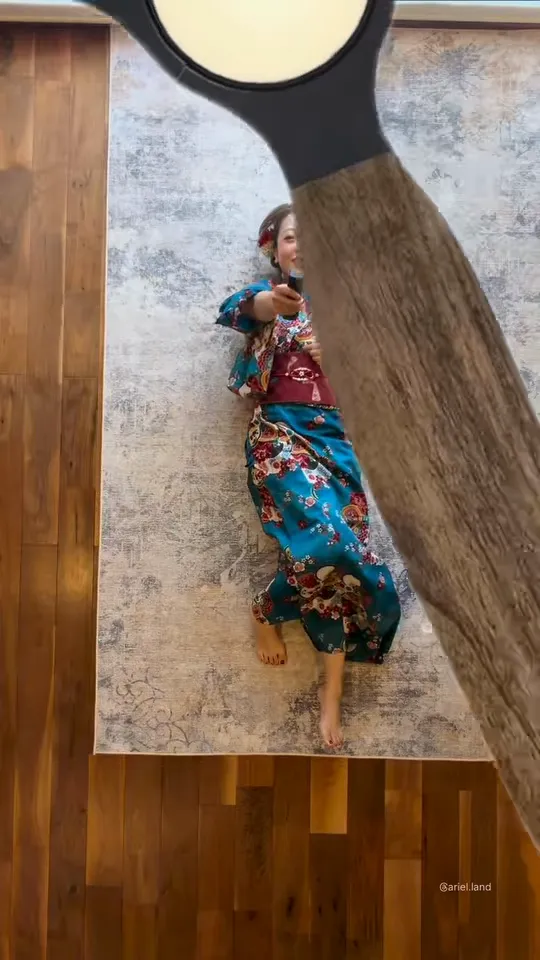
In this frame from @ariel.land, a woman lies on a grey rug over dark wooden flooring in a blue floral kimono as a wooden blade sweeps in from the right. Across the clip, she rotates through several Japanese kimono and yukata styles, with a red look appearing right behind the pass. This clip earned around 177k likes and highlights how the ai ceiling fan trend handles ornate patterns.
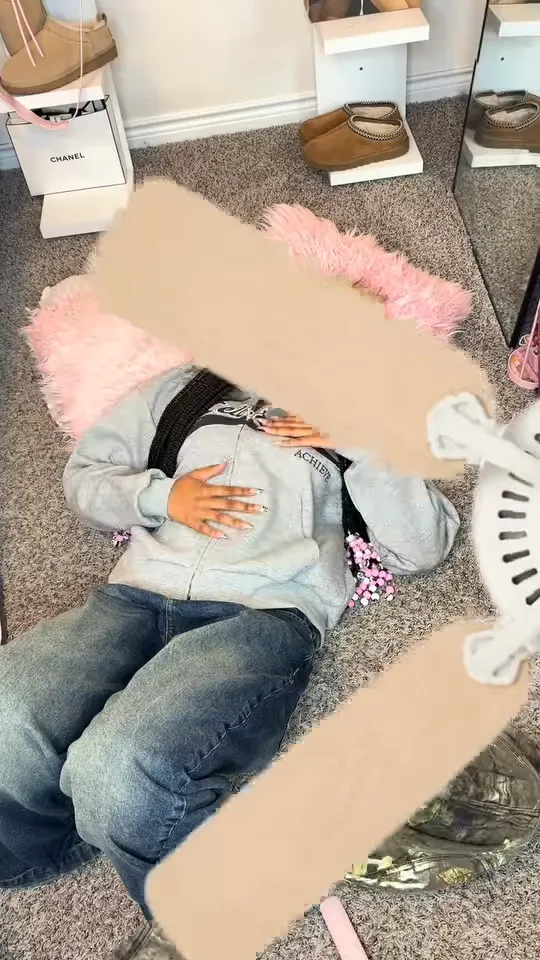
Creator @_.maddygrace takes a manual approach, editing each cut by hand rather than using automated software. She rests on a grey carpet with a pink fluffy pillow in a light-blue hoodie and baggy jeans while a beige paper blade wipes across her face. This practical ceiling fan transition switches between casual hoodies, cargo pants, and sweaters across the edit.
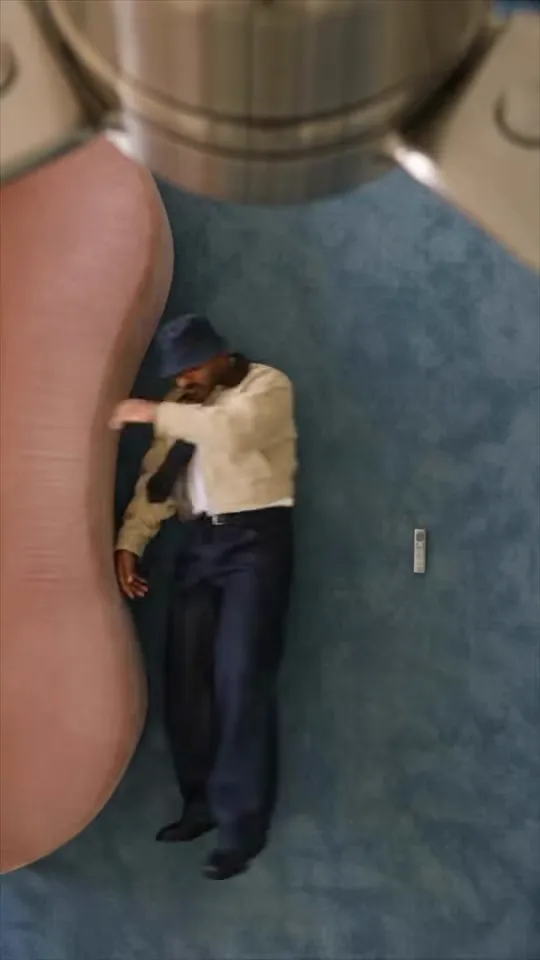
This frame from @kayo captures the AI segment of an overhead tutorial reel. The creator lies on a blue carpet in a beige jacket, white shirt, tie, wide-leg trousers, and a bucket hat beneath a chrome fixture. The tailored mix of formal tailoring and street pieces connects well with our Decades Retro style option.
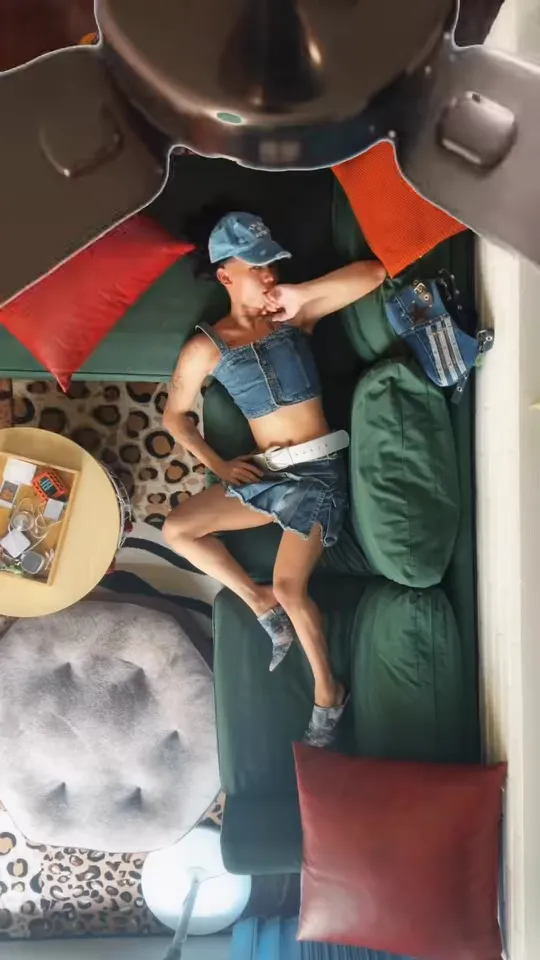
Creator @zymbading recreated the ai ceiling fan trend entirely without software, changing outfits physically beneath a spinning ceiling fan. He lies sideways on a green sofa wearing a denim vest, matching shorts, and a denim cap, framed by red and orange cushions. Across the clip, he changes into leopard print and athletic jerseys between blade passes.
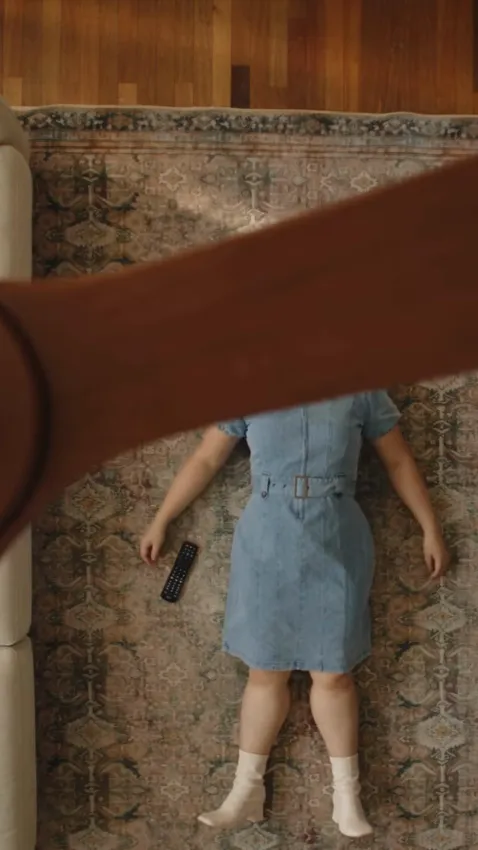
In this clip from @wenqiqi, a woman lies flat on a patterned rug in a blue denim shirt-dress and white socks while a brown wooden blade sweeps over her body. She holds a small controller and later switches into a cream blouse and skirt, a grey dress, and a monochrome set. None of our current style options directly mirror this clean daily wardrobe.
Why You Cannot Make a Celebrity Version
When experimenting with the ai ceiling fan trend, you must only upload photos of yourself or individuals who have given you explicit consent to use their likeness. Photos of real celebrities or public figures are not allowed. Facial details stay close to your uploaded photo, but subtle facial variations naturally occur across generated frames.
Before writing this guide we reviewed 20 public example clips of the trend from five AI tool sites; all 20 used the same top-down shot, two showed a cat instead of a person, and none showed a couple. Respecting personal privacy keeps community platforms accessible for everyone. If you want themed holiday transformations for your own photos, try our AI Halloween costume from a photo tool.
Tool Price Comparison
The table below outlines current operational costs and features across popular services running top-down overhead fan formats.
| Tool | Photos | Length | Price | Song included | Refund on fail | Read on |
|---|---|---|---|---|---|---|
| Ricebowl | 1 or 2 (you, a couple, or a pet) | 5 s or 10 s, 9:16, 768p | 20 credits per 5 s clip, 40 per 10 s; new accounts get 8 free credits (not enough for a 5 s clip); paid plans from $7.99/month for 200 credits | Built-in instrumental beat, no vocals (not a trending song) | Yes, credits are refunded automatically | 2026-10-11 |
| MakeViral | 1 full-body photo | 10 s, 9:16, 720p | 26 credits per clip; cheapest one-time pack $11.99 for 100 credits ($0.12 a credit); weekly plan $11.99 (first week $5.49) for 130 credits | Fan whir plus an original pop instrumental, no trending song | Yes, credits come back if a video fails | 2026-10-11 |
| Fuzana | 1 | 5 s, 10 s or 15 s, 9:16 | 20 credits for 5 s, 24 for 10 s, 25 for 15 s; cheapest one-time pack $11.99 for 25 credits; free photo preview without an account | An AI beat, never a song (a silent copy is also provided) | Not stated | 2026-10-11 |
| AIReel | Multiple outfit photos (number not stated) | Adjustable (options not stated on the page) | From $9.99/month billed annually ($119.99/year) for 3,000 credits, up to 50 videos; $13.99 month-to-month | Not stated (the page suggests adding trending audio when posting) | Yes, failed videos do not cost credits | 2026-10-11 |
| Media.io | 1 | Not stated | Free credits on signup plus 3 daily check-in credits; paid from US$5.99/month billed annually (US$71.88/year) for 100 credits/month, US$10.99 month-to-month; credits per clip not stated | Not stated | Not stated for failed generations (7-day money-back guarantee on purchases) | 2026-10-11 |
| Pixazo | 1 overhead-style photo | Not stated | Free to start, new accounts get 100 credits; HD exports and premium models use credits; Pro S$17/month for 300 credits (shown in SGD from our location); credits per clip not stated | Not stated | Not stated | 2026-10-11 |
When deciding where to create your ai ceiling fan trend clip, compare how many photos each system requires, available video durations, overall credit pricing, whether background audio comes pre-attached, and whether failed generations offer credit refunds. Automated credit returns ensure you do not burn your monthly quota on technical errors. You can also look at other photo-to-video trends on the site, like the hotel lobby AI video trend, our funny birthday video generator, or the put a ring on it dog AI video maker for pets.
Prompts Behind the Overhead Fan Style
Behind every style chip on our ceiling fan outfit change AI page sits an optimized prompt. If you want to modify individual wardrobe items or tweak lighting nuances directly, you can paste the ceiling fan trend ai prompt structures below into the MiniMax H3 model page.
Here is the exact prompt running behind Classic Party:
One reference image of one person. The person in reference image 1 keeps the same face and same hair as reference image 1 in every frame; only the clothes change. Overhead shot looking straight down from the ceiling at a cozy living-room floor covered by a colorful patterned rug, soft warm daylight. A spinning ceiling fan hangs right under the camera, and the dark fan blades sweep across the frame close to the lens again and again. The person in reference image 1 lies flat on the back in the middle of the rug, the face turned up toward the camera, brightly lit and clearly visible, holding a small remote control up toward the fan. Each time a fan blade sweeps across the frame, the clothes of the person in reference image 1 switch instantly like a quick wipe transition: first the everyday outfit from reference image 1, then after one blade pass a sparkly sequin party outfit, then after the next blade pass a glamorous red-carpet evening look. Vertical phone-video shot, static camera fixed at the ceiling looking straight down, the whole rug and everyone on the rug in frame. No text, no logos, no brand names. Audio: upbeat pop dance beat with a punchy bass and a soft whoosh on every fan blade pass, instrumental only, no lyrics, no dialogue.Here is the prompt powering the Matching Couple preset:
Two reference images. Exactly two people lie side by side on the rug: the person in reference image 1 and the person in reference image 2, each keeping the same face and same hair as the matching reference image in every frame, only the clothes change; never duplicate, swap or merge the two. Overhead shot looking straight down from the ceiling at a cozy living-room floor covered by a colorful patterned rug, soft warm daylight. A spinning ceiling fan hangs right under the camera, and the dark fan blades sweep across the frame close to the lens again and again. The person in reference image 1 and the person in reference image 2 lie flat on the back side by side in the middle of the rug, shoulders touching, both faces turned up toward the camera, brightly lit and clearly visible. The person in reference image 1 holds a small remote control up toward the fan. Each time a fan blade sweeps across the frame, the clothes of the person in reference image 1 and the person in reference image 2 switch together instantly into matching couple outfits, like a quick wipe transition: first the everyday outfits from the reference images, then after one blade pass matching white T-shirts with blue denim jackets, then after the next blade pass matching cozy red knit sweaters, then after the last blade pass coordinated black formal evening wear. The video ends on the person in reference image 1 and the person in reference image 2 side by side in the matching outfits, both faces clearly visible, both turned toward the camera. Vertical phone-video shot, static camera fixed at the ceiling looking straight down, the whole rug and everyone on the rug in frame. No text, no logos, no brand names. Audio: upbeat pop dance beat with a punchy bass and a soft whoosh on every fan blade pass, instrumental only, no lyrics, no dialogue.Here is the prompt for the Cozy Pet style chip:
One reference image of one pet. The pet in reference image 1 keeps the same fur, markings, face and body as reference image 1 in every frame; only the little outfits change. Overhead shot looking straight down from the ceiling at a cozy living-room floor covered by a colorful patterned rug, soft warm daylight. A spinning ceiling fan hangs right under the camera, and the dark fan blades sweep across the frame close to the lens again and again. The pet in reference image 1 lies on the back in the middle of the rug with the front paws tucked up, the face turned up toward the camera, brightly lit and clearly visible. Each time a fan blade sweeps across the frame, a new little pet outfit appears on the pet in reference image 1 instantly, like a quick wipe transition: first just the natural fur with no outfit, then after one blade pass a cozy knitted sweater, then after the next blade pass a tiny black tuxedo jacket with a bow tie. The pet in reference image 1 stays a real animal the whole time and never stands up, and every paw stays a real animal paw, never a human hand. Vertical phone-video shot, static camera fixed at the ceiling looking straight down, the whole rug and everyone on the rug in frame. No text, no logos, no brand names. Audio: upbeat pop dance beat with a punchy bass and a soft whoosh on every fan blade pass, instrumental only, no lyrics, no dialogue.Before You Post Your Video
Before exporting your finished ai ceiling fan trend clip to public video apps, keep a few operational rules in mind. First, if a generation encounters a server error, our system refunds your credits automatically back to your account balance. Second, always get permission before uploading a friend’s picture into an automated generator. Third, ensure the source image contains no visible brand logos, trademarks, or copyrighted artwork across the rug or clothing. Finally, remember to mark your upload with the platform’s AI-generated content label, as TikTok asks creators to label AI-generated content whenever sharing automated visuals. If you do not have an active paid subscription, generated clips may appear in our public community Explore feed.
The ai ceiling fan trend thrives on visual rhythm and crisp transitions. Because the ceiling fan transition relies on precise blade wipe timing, keeping your composition clean produces the sharpest result. With the right ceiling fan transition setup on our under the fan AI tool, participating in the ai ceiling fan trend is accessible from any portrait.
The ai ceiling fan trend continues to be a favorite among creators exploring automated fashion transitions. Whether you want a dynamic party transition or a cozy pet transformation, the ai ceiling fan trend provides an accessible way to join the movement.
Sources
- Google Search results for ‘ai ceiling fan trend’ and ‘how to do the ai ceiling fan trend’, read 2026-10-11
- Public example clips on five AI tool sites (20 clips reviewed), read 2026-10-11
- Pricing pages of the tools in the comparison table, read 2026-10-11
- The Tab, article on the AI ceiling fan trend, published 2026-09-28, read 2026-10-11
- TikTok Support, rules on labeling AI-generated content, read 2026-10-11
- Instagram Reels by @ariel.land, @_.maddygrace, @kayo, @zymbading and @wenqiqi, posts DeNnWyvTNhr, DeFh56yDVdB, Dd4VqONgjGf, DeGwxxWSSlc and DeOLzVyvSQq, read 2026-10-11